SoloMono modules shop
count(): Parameter must be an array or an object that implements Countable (500 Whoops, looks like something went wrong.)

count(): Parameter must be an array or an object that implements Countable

Exception

ErrorException

  1.                         </div>
  2.                         <?
  3.                         array_shift($smallImages);
  4.                         ?>
  5.                         <?php
  6.                             if(count($smallImages) > 3) {
  7.                                 $smallImgCounter 1;
  8.                                 echo '<div class="marketplace_page__card_smallImages smallImages-slider  owl-carousel owl-theme owl-loaded owl-carousel owl-drag">';
  9.                                 foreach ($smallImages as $value) {
  10.                                     echo '<a data-fancybox="module_images" data-lightbox="image-1" href="getimage/' $value '">
  11.                                         <img class="lazyload marketplace__cart-ico marketplace__round-ico"
  1.         //ini_set('error_log' , '/home/solomono/web/solomono.net/sites/dev/php.log');
  2.         error_reporting(E_ALL);
  3.         set_error_handler(function($level$message$file ''$line 0) {
  4.             $this->handleError($level$message$file$line);
  5.         });
  6.         set_exception_handler(function($e) {
  7.             $this->handleException($e);
  8.         });
  1.                         </div>
  2.                         <?
  3.                         array_shift($smallImages);
  4.                         ?>
  5.                         <?php
  6.                             if(count($smallImages) > 3) {
  7.                                 $smallImgCounter 1;
  8.                                 echo '<div class="marketplace_page__card_smallImages smallImages-slider  owl-carousel owl-theme owl-loaded owl-carousel owl-drag">';
  9.                                 foreach ($smallImages as $value) {
  10.                                     echo '<a data-fancybox="module_images" data-lightbox="image-1" href="getimage/' $value '">
  11.                                         <img class="lazyload marketplace__cart-ico marketplace__round-ico"
require('/home/solomono/web/hetzner.solomono.net/templates/content/product_info_new.php') in /home/solomono/web/hetzner.solomono.net/templates/solo/main_page.tpl.php (line 502)
  1.     <?php if ($content == 'index_default'): ?>
  2.         <?php require(DIR_WS_TEMPLATES TEMPLATE_NAME '/mainpage_modules/slider_main.php'); ?>
  3.     <?php endif ?>
  4.     <?php if (isset($_GET['products_id']) && !productIsTemplate($_GET['products_id']))
  5.         require(DIR_WS_CONTENT 'product_info_new.php');
  6.     else
  7.         require(DIR_WS_CONTENT $content '.tpl.php');
  8.     ?>
  9.     <div class="hFooter"></div>
  10. </main>
require('/home/solomono/web/hetzner.solomono.net/templates/solo/main_page.tpl.php') in /home/solomono/web/hetzner.solomono.net/product_info.php (line 102)
  1.   }
  2.   $content CONTENT_PRODUCT_INFO;
  3. //  $javascript = 'product_info.js';
  4.    
  5.   require(DIR_WS_TEMPLATES TEMPLATE_NAME '/' TEMPLATENAME_MAIN_PAGE);
  6.   
  7.   require(DIR_WS_INCLUDES 'application_bottom.php');
  8.   
  9.   

Stack Trace

ErrorException
ErrorException:
count(): Parameter must be an array or an object that implements Countable

  at /home/solomono/web/hetzner.solomono.net/templates/content/product_info_new.php:98
  at Bootstrap\HandleExceptions->handleError()
     (/home/solomono/web/hetzner.solomono.net/bootstrap/HandleExceptions.php:32)
  at Bootstrap\HandleExceptions->Bootstrap\{closure}()
     (/home/solomono/web/hetzner.solomono.net/templates/content/product_info_new.php:98)
  at require('/home/solomono/web/hetzner.solomono.net/templates/content/product_info_new.php')
     (/home/solomono/web/hetzner.solomono.net/templates/solo/main_page.tpl.php:502)
  at require('/home/solomono/web/hetzner.solomono.net/templates/solo/main_page.tpl.php')
     (/home/solomono/web/hetzner.solomono.net/product_info.php:102)                
Invalid argument supplied for foreach() (500 Whoops, looks like something went wrong.)

Invalid argument supplied for foreach()

Exception

ErrorException

  1.                                 }
  2.                                 echo '</div>';
  3.                             } else {
  4.                                 echo '<div class="marketplace_page__card_smallImages smallImages_without_slider">';
  5.                                 foreach ($smallImages as $value) {
  6.                                     echo '<a data-fancybox="module_images" data-lightbox="image-1" href="getimage/' $value '">
  7.                                         <img class="lazyload marketplace__cart-ico marketplace__round-ico"
  8.                                          data-id="' $item['products_id'] . '"
  9.                                          src="images/pixel_trans.png"
  10.                                          data-src="' "getimage/" $value '"
  1.         //ini_set('error_log' , '/home/solomono/web/solomono.net/sites/dev/php.log');
  2.         error_reporting(E_ALL);
  3.         set_error_handler(function($level$message$file ''$line 0) {
  4.             $this->handleError($level$message$file$line);
  5.         });
  6.         set_exception_handler(function($e) {
  7.             $this->handleException($e);
  8.         });
HandleExceptions->Bootstrap\{closure}() in /home/solomono/web/hetzner.solomono.net/templates/content/product_info_new.php (line 114)
  1.                                 }
  2.                                 echo '</div>';
  3.                             } else {
  4.                                 echo '<div class="marketplace_page__card_smallImages smallImages_without_slider">';
  5.                                 foreach ($smallImages as $value) {
  6.                                     echo '<a data-fancybox="module_images" data-lightbox="image-1" href="getimage/' $value '">
  7.                                         <img class="lazyload marketplace__cart-ico marketplace__round-ico"
  8.                                          data-id="' $item['products_id'] . '"
  9.                                          src="images/pixel_trans.png"
  10.                                          data-src="' "getimage/" $value '"
require('/home/solomono/web/hetzner.solomono.net/templates/content/product_info_new.php') in /home/solomono/web/hetzner.solomono.net/templates/solo/main_page.tpl.php (line 502)
  1.     <?php if ($content == 'index_default'): ?>
  2.         <?php require(DIR_WS_TEMPLATES TEMPLATE_NAME '/mainpage_modules/slider_main.php'); ?>
  3.     <?php endif ?>
  4.     <?php if (isset($_GET['products_id']) && !productIsTemplate($_GET['products_id']))
  5.         require(DIR_WS_CONTENT 'product_info_new.php');
  6.     else
  7.         require(DIR_WS_CONTENT $content '.tpl.php');
  8.     ?>
  9.     <div class="hFooter"></div>
  10. </main>
require('/home/solomono/web/hetzner.solomono.net/templates/solo/main_page.tpl.php') in /home/solomono/web/hetzner.solomono.net/product_info.php (line 102)
  1.   }
  2.   $content CONTENT_PRODUCT_INFO;
  3. //  $javascript = 'product_info.js';
  4.    
  5.   require(DIR_WS_TEMPLATES TEMPLATE_NAME '/' TEMPLATENAME_MAIN_PAGE);
  6.   
  7.   require(DIR_WS_INCLUDES 'application_bottom.php');
  8.   
  9.   

Stack Trace

ErrorException
ErrorException:
Invalid argument supplied for foreach()

  at /home/solomono/web/hetzner.solomono.net/templates/content/product_info_new.php:114
  at Bootstrap\HandleExceptions->handleError()
     (/home/solomono/web/hetzner.solomono.net/bootstrap/HandleExceptions.php:32)
  at Bootstrap\HandleExceptions->Bootstrap\{closure}()
     (/home/solomono/web/hetzner.solomono.net/templates/content/product_info_new.php:114)
  at require('/home/solomono/web/hetzner.solomono.net/templates/content/product_info_new.php')
     (/home/solomono/web/hetzner.solomono.net/templates/solo/main_page.tpl.php:502)
  at require('/home/solomono/web/hetzner.solomono.net/templates/solo/main_page.tpl.php')
     (/home/solomono/web/hetzner.solomono.net/product_info.php:102)                

Database migration (osCommerce)

Date of creation : 2020-12-22
94
1 2 3 4 5
icon 3,5k
Database migration (osCommerce)
pro

If you are looking for an alt="Database migration (osCommerce) - 1" ernative to an outdated site, we will help you move painlessly - Migrating to SoloMono in just a few clicks.

You can sell, immediately after importing the database, without spending time to complete. What will allow you to deal with orders, not improvements, and you will not have to think - "how to improve your store? " - we have already done it for you.

The complete transfer of the directory is carried out with the preservation of links, ie you do not have to promote the site again - SoloMono is ready to move. It is easy to configure redirecting links in the admin panel from old links to new ones. And also it is possible to finish shop for any needs, to create interaction functions or to add new price formulas.

Import algorithm:

If you have installed and enabled this module then in the admin panel Goods / Import export you will have access to osCommerce import.
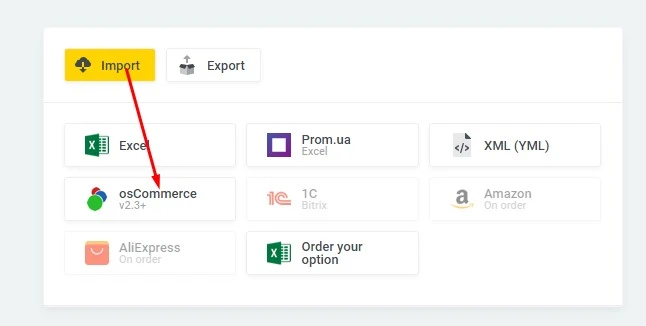
Database migration (osCommerce) - 2

If you open this tab you can see a very concise interface.
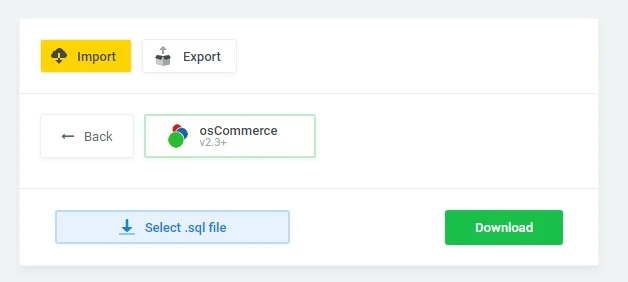
Database migration (osCommerce) - 3

The first button is to select a database file, and the second is to start downloading your database.

Once downloaded, you will see a list of tables from your database.
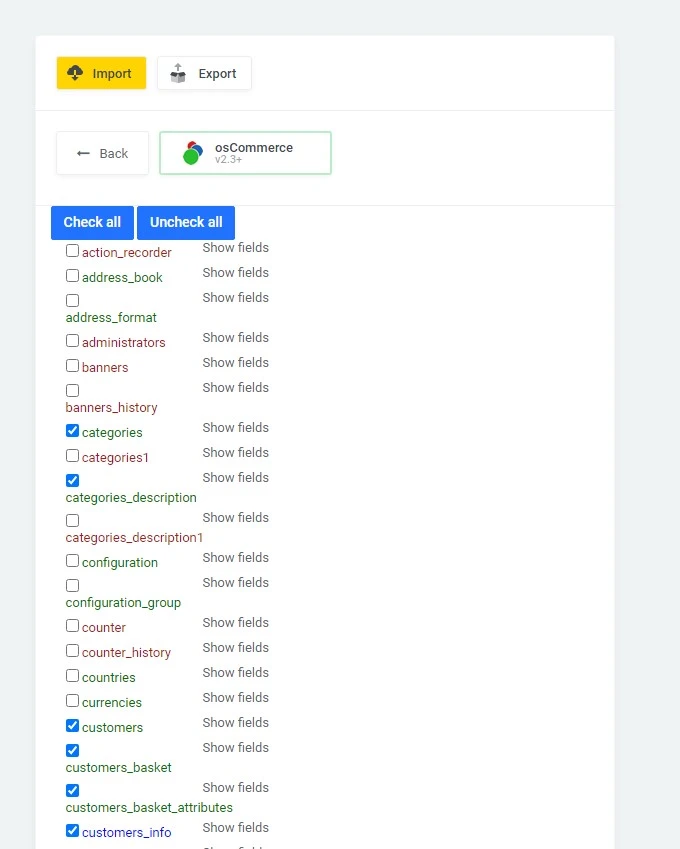
Database migration (osCommerce) - 4

You can see that they are displayed in different colors. Red means that the information in this table will not be used by our functionality in the future, so it makes no sense to mark and import it. Blue means that the table contains certain fields for which it has no functionality so they also do not need to be imported. If you click on the Show fields button next to the blue table, you can see which fields do not need to be imported (they will be red).

The tables with the main information will be marked by default, you can also mark any others you deem necessary and click the Submit button to start the import. Depending on the size of your database, imports may take some time.

After importing you will see the following form.
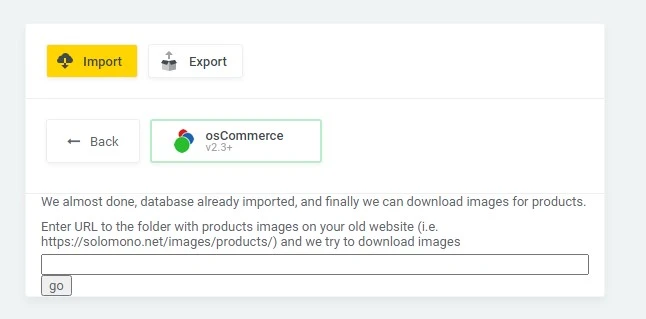
Database migration (osCommerce) - 5

If you enter the path to the product image folder on your old site, the module will try to automatically import the image. It is worth noting that at the moment the module imports only images of goods, all others must be copied yourself.

Everything after importing images your site is ready.