SoloMono modules shop
count(): Parameter must be an array or an object that implements Countable (500 Whoops, looks like something went wrong.)

count(): Parameter must be an array or an object that implements Countable

Exception

ErrorException

  1.                         </div>
  2.                         <?
  3.                         array_shift($smallImages);
  4.                         ?>
  5.                         <?php
  6.                             if(count($smallImages) > 3) {
  7.                                 $smallImgCounter 1;
  8.                                 echo '<div class="marketplace_page__card_smallImages smallImages-slider  owl-carousel owl-theme owl-loaded owl-carousel owl-drag">';
  9.                                 foreach ($smallImages as $value) {
  10.                                     echo '<a data-fancybox="module_images" data-lightbox="image-1" href="getimage/' $value '">
  11.                                         <img class="lazyload marketplace__cart-ico marketplace__round-ico"
  1.         //ini_set('error_log' , '/home/solomono/web/solomono.net/sites/dev/php.log');
  2.         error_reporting(E_ALL);
  3.         set_error_handler(function($level$message$file ''$line 0) {
  4.             $this->handleError($level$message$file$line);
  5.         });
  6.         set_exception_handler(function($e) {
  7.             $this->handleException($e);
  8.         });
  1.                         </div>
  2.                         <?
  3.                         array_shift($smallImages);
  4.                         ?>
  5.                         <?php
  6.                             if(count($smallImages) > 3) {
  7.                                 $smallImgCounter 1;
  8.                                 echo '<div class="marketplace_page__card_smallImages smallImages-slider  owl-carousel owl-theme owl-loaded owl-carousel owl-drag">';
  9.                                 foreach ($smallImages as $value) {
  10.                                     echo '<a data-fancybox="module_images" data-lightbox="image-1" href="getimage/' $value '">
  11.                                         <img class="lazyload marketplace__cart-ico marketplace__round-ico"
require('/home/solomono/web/hetzner.solomono.net/templates/content/product_info_new.php') in /home/solomono/web/hetzner.solomono.net/templates/solo/main_page.tpl.php (line 502)
  1.     <?php if ($content == 'index_default'): ?>
  2.         <?php require(DIR_WS_TEMPLATES TEMPLATE_NAME '/mainpage_modules/slider_main.php'); ?>
  3.     <?php endif ?>
  4.     <?php if (isset($_GET['products_id']) && !productIsTemplate($_GET['products_id']))
  5.         require(DIR_WS_CONTENT 'product_info_new.php');
  6.     else
  7.         require(DIR_WS_CONTENT $content '.tpl.php');
  8.     ?>
  9.     <div class="hFooter"></div>
  10. </main>
require('/home/solomono/web/hetzner.solomono.net/templates/solo/main_page.tpl.php') in /home/solomono/web/hetzner.solomono.net/product_info.php (line 102)
  1.   }
  2.   $content CONTENT_PRODUCT_INFO;
  3. //  $javascript = 'product_info.js';
  4.    
  5.   require(DIR_WS_TEMPLATES TEMPLATE_NAME '/' TEMPLATENAME_MAIN_PAGE);
  6.   
  7.   require(DIR_WS_INCLUDES 'application_bottom.php');
  8.   
  9.   

Stack Trace

ErrorException
ErrorException:
count(): Parameter must be an array or an object that implements Countable

  at /home/solomono/web/hetzner.solomono.net/templates/content/product_info_new.php:98
  at Bootstrap\HandleExceptions->handleError()
     (/home/solomono/web/hetzner.solomono.net/bootstrap/HandleExceptions.php:32)
  at Bootstrap\HandleExceptions->Bootstrap\{closure}()
     (/home/solomono/web/hetzner.solomono.net/templates/content/product_info_new.php:98)
  at require('/home/solomono/web/hetzner.solomono.net/templates/content/product_info_new.php')
     (/home/solomono/web/hetzner.solomono.net/templates/solo/main_page.tpl.php:502)
  at require('/home/solomono/web/hetzner.solomono.net/templates/solo/main_page.tpl.php')
     (/home/solomono/web/hetzner.solomono.net/product_info.php:102)                
Invalid argument supplied for foreach() (500 Whoops, looks like something went wrong.)

Invalid argument supplied for foreach()

Exception

ErrorException

  1.                                 }
  2.                                 echo '</div>';
  3.                             } else {
  4.                                 echo '<div class="marketplace_page__card_smallImages smallImages_without_slider">';
  5.                                 foreach ($smallImages as $value) {
  6.                                     echo '<a data-fancybox="module_images" data-lightbox="image-1" href="getimage/' $value '">
  7.                                         <img class="lazyload marketplace__cart-ico marketplace__round-ico"
  8.                                          data-id="' $item['products_id'] . '"
  9.                                          src="images/pixel_trans.png"
  10.                                          data-src="' "getimage/" $value '"
  1.         //ini_set('error_log' , '/home/solomono/web/solomono.net/sites/dev/php.log');
  2.         error_reporting(E_ALL);
  3.         set_error_handler(function($level$message$file ''$line 0) {
  4.             $this->handleError($level$message$file$line);
  5.         });
  6.         set_exception_handler(function($e) {
  7.             $this->handleException($e);
  8.         });
HandleExceptions->Bootstrap\{closure}() in /home/solomono/web/hetzner.solomono.net/templates/content/product_info_new.php (line 114)
  1.                                 }
  2.                                 echo '</div>';
  3.                             } else {
  4.                                 echo '<div class="marketplace_page__card_smallImages smallImages_without_slider">';
  5.                                 foreach ($smallImages as $value) {
  6.                                     echo '<a data-fancybox="module_images" data-lightbox="image-1" href="getimage/' $value '">
  7.                                         <img class="lazyload marketplace__cart-ico marketplace__round-ico"
  8.                                          data-id="' $item['products_id'] . '"
  9.                                          src="images/pixel_trans.png"
  10.                                          data-src="' "getimage/" $value '"
require('/home/solomono/web/hetzner.solomono.net/templates/content/product_info_new.php') in /home/solomono/web/hetzner.solomono.net/templates/solo/main_page.tpl.php (line 502)
  1.     <?php if ($content == 'index_default'): ?>
  2.         <?php require(DIR_WS_TEMPLATES TEMPLATE_NAME '/mainpage_modules/slider_main.php'); ?>
  3.     <?php endif ?>
  4.     <?php if (isset($_GET['products_id']) && !productIsTemplate($_GET['products_id']))
  5.         require(DIR_WS_CONTENT 'product_info_new.php');
  6.     else
  7.         require(DIR_WS_CONTENT $content '.tpl.php');
  8.     ?>
  9.     <div class="hFooter"></div>
  10. </main>
require('/home/solomono/web/hetzner.solomono.net/templates/solo/main_page.tpl.php') in /home/solomono/web/hetzner.solomono.net/product_info.php (line 102)
  1.   }
  2.   $content CONTENT_PRODUCT_INFO;
  3. //  $javascript = 'product_info.js';
  4.    
  5.   require(DIR_WS_TEMPLATES TEMPLATE_NAME '/' TEMPLATENAME_MAIN_PAGE);
  6.   
  7.   require(DIR_WS_INCLUDES 'application_bottom.php');
  8.   
  9.   

Stack Trace

ErrorException
ErrorException:
Invalid argument supplied for foreach()

  at /home/solomono/web/hetzner.solomono.net/templates/content/product_info_new.php:114
  at Bootstrap\HandleExceptions->handleError()
     (/home/solomono/web/hetzner.solomono.net/bootstrap/HandleExceptions.php:32)
  at Bootstrap\HandleExceptions->Bootstrap\{closure}()
     (/home/solomono/web/hetzner.solomono.net/templates/content/product_info_new.php:114)
  at require('/home/solomono/web/hetzner.solomono.net/templates/content/product_info_new.php')
     (/home/solomono/web/hetzner.solomono.net/templates/solo/main_page.tpl.php:502)
  at require('/home/solomono/web/hetzner.solomono.net/templates/solo/main_page.tpl.php')
     (/home/solomono/web/hetzner.solomono.net/product_info.php:102)                

Editable attributes inside product page

Date of creation : 2018-09-21
94
1 2 3 4 5
icon 5,1k
Editable attributes inside product page
free, junior, seo, pro

Product attributes are a must-have feature for every online store. For one product, you can assign different color options, sizes, type of material, etc. For a smartphone, you can assign an attribute in the basic version or complete with a protective glass and case. For TVs, the attribute can be the screen diagonal, the presence of the Smart-TV function, etc.

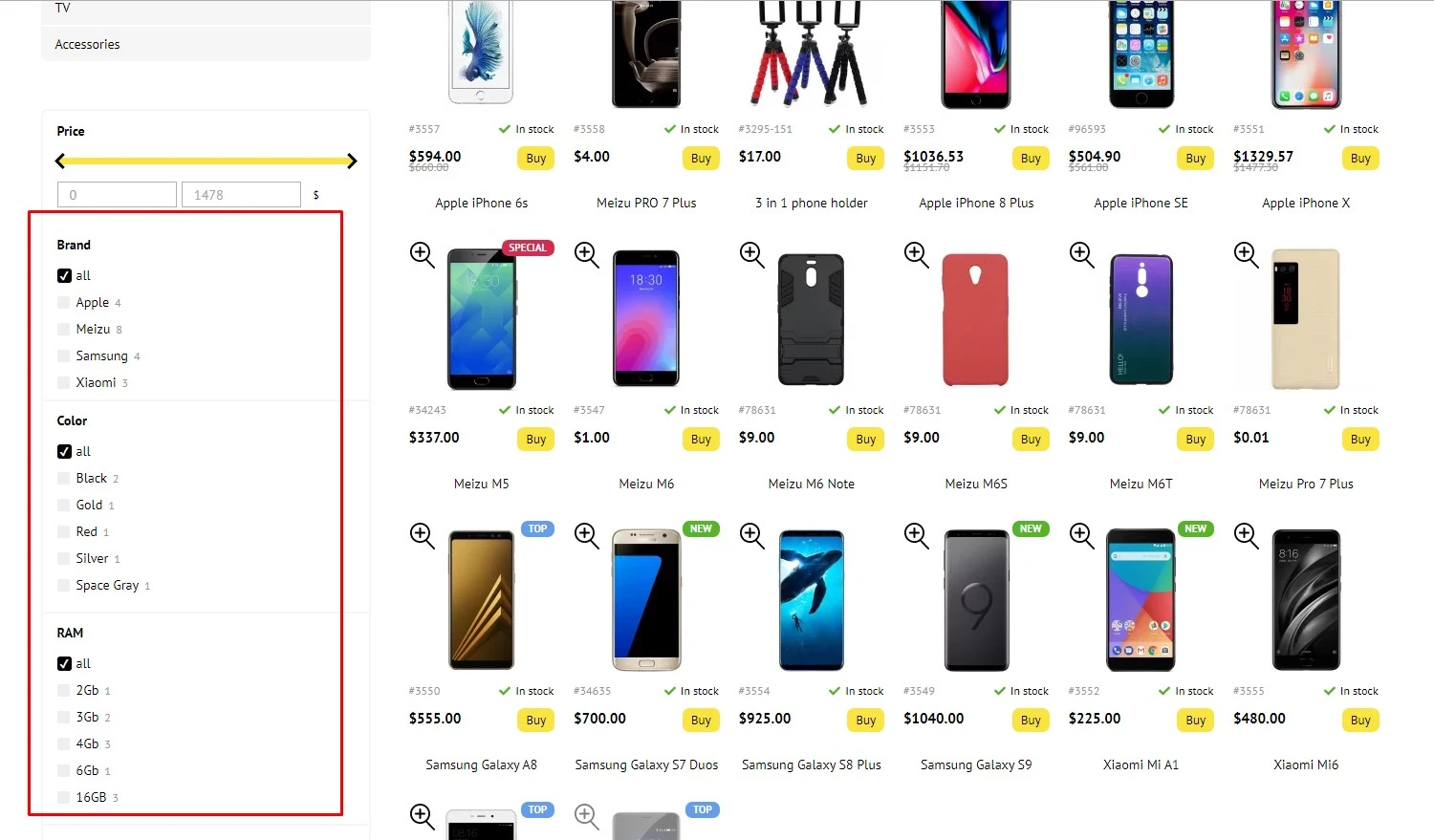
Attributes will make it easier for your customers to find products if the catalog is large. For example, a customer is only interested in a specific product color or brand. All possible attributes of goods will be indicated in the left column, an example in the screenshot
Editable attributes inside product page - 1

Attributes help:

  1. Customers quickly search for a product, which means faster to make a purchase;
  2. Assign several characteristics to one product. When you select a certain characteristic, the price will automatically change. This significantly reduces the time, since there is no need to start a new product card several times.
  3. If you work with several suppliers, the attributes of goods can be used for information about the suppliers (for example, in which warehouse the goods are located) or any other information that will help facilitate the internal processes of the store. To prevent these attributes from being displayed on the site, disable the corresponding slider in the admin panel.

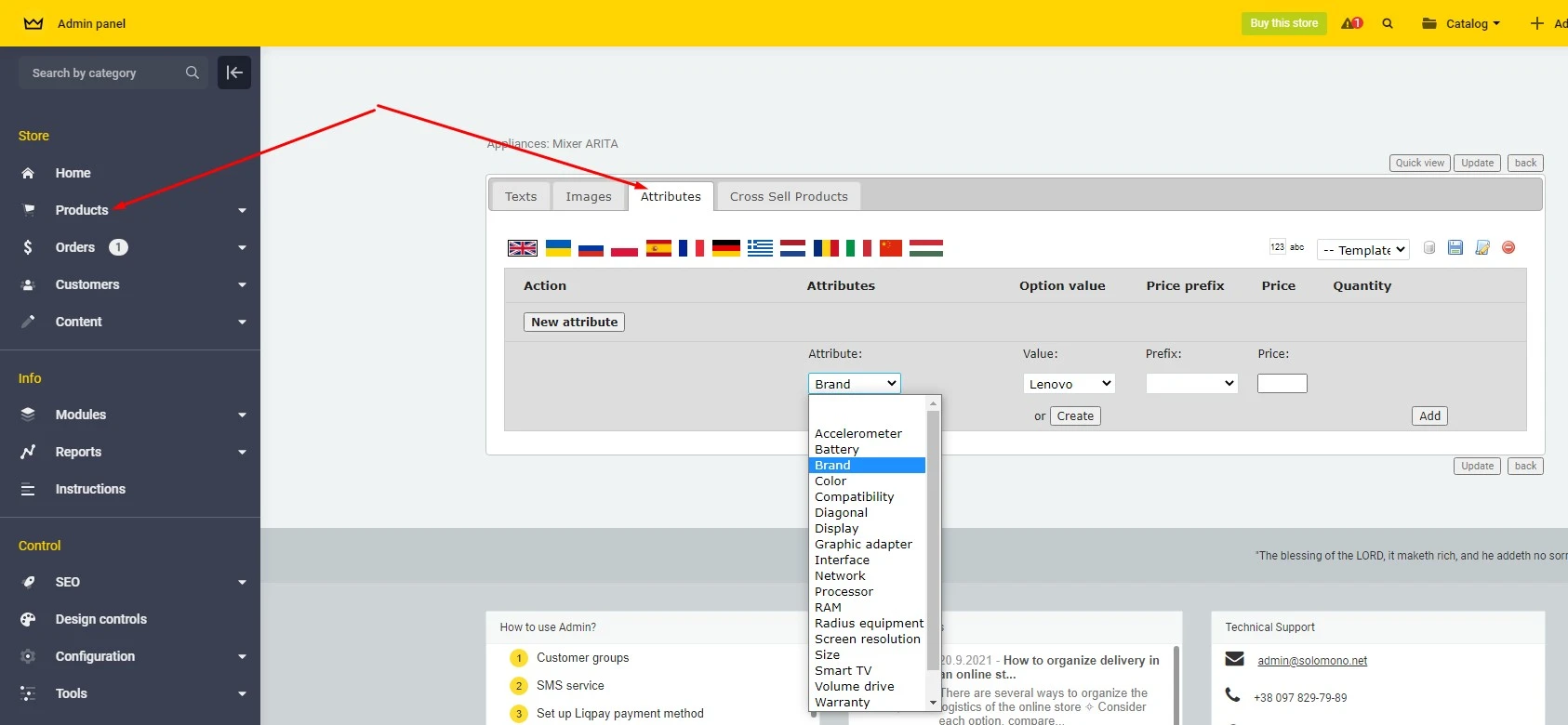
Editing attributes will allow you to quickly change existing product characteristics or add new ones. In the admin panel, select the attribute that you want to edit and change the value to one from the drop-down list.
Editable attributes inside product page - 2

You can add a price prefix or set a fixed price to each selected attribute. When your customer selects a specific product attribute (such as color or size), the price will automatically change.